 Open full size
What goes in an XFProj workspace
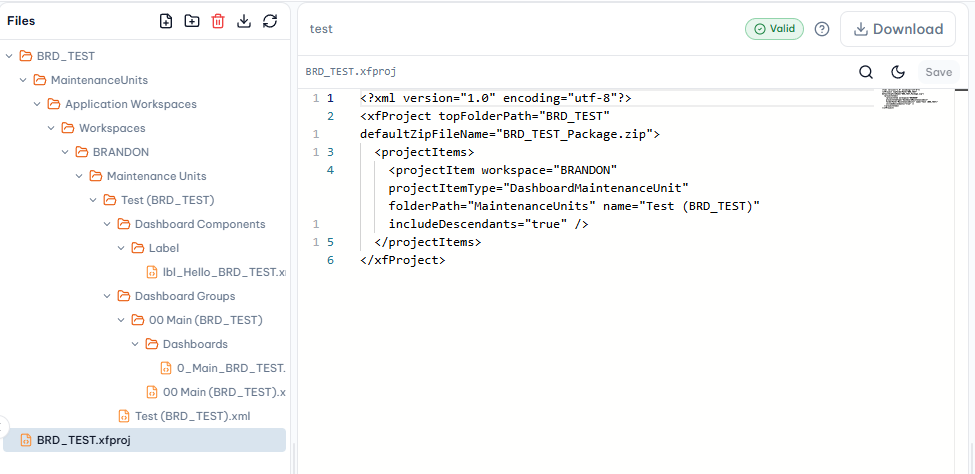
An XFProj file defines which OneStream objects should be extracted or loaded as a single package — typically a mix of:
- Dashboard Maintenance Units and Dashboard Groups
- Cube View Groups and Cube View Profiles
- Business rules (Dashboard Extender, Dashboard Data Set, Dashboard XFBR String, and others)
- Data Management Groups and other supporting metadata
Because the extract is written to a local folder structure, it can be checked into Git like any other codebase — letting more than one person work on the same solution without stepping on each other's changes.
Editing a workspace in OneCraft
OneCraft keeps your XFProj-based project in a persistent workspace: a file tree, an editor, and an AI chat panel side by side. You can describe a change in plain English, review what changed file by file, and every write is checked — naming conventions, XML structure, and (for code) compilation — before you export a package ready to load back into OneStream.
This means you are not limited to a one-shot generation step. You can close the browser, come back later, and keep iterating on the same project — see OneStream Dashboard Builder for what a typical first build looks like.
Related resources
Ready to build this in OneCraft?
Describe what you need in plain English — OneCraft drafts and validates the OneStream files for you.